

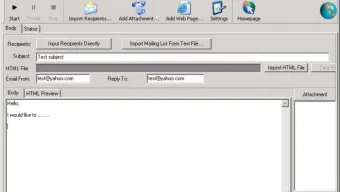

Description
Download 123 Bulk Email Direct Sender – Fast, Secure Bulk Email Tool for Windows
Overview
123 Bulk Email Direct Sender is a lightweight Windows‑based communication utility designed specifically for sending large volumes of e‑mail in a single operation. First added to software directories in 2006, the tool has amassed more than 6,000 downloads, with a steady stream of fresh installations each week. Although the program is offered as a trial version, it provides enough functionality for small businesses, marketers, and nonprofit organizations that need a reliable way to reach hundreds or thousands of contacts without relying on expensive cloud‑based services. The current version 4.66, released on June 28 2006, runs on legacy operating systems such as Windows 98 and earlier, making it an attractive option for users who maintain older hardware or who prefer a no‑frills, on‑premise solution. The software is distributed in English only and occupies a fraction of typical disk space required by modern bulk‑mail platforms, which helps keep the overall system footprint low. Its popularity in emerging markets—including Nigeria, Pakistan, and Latvia—highlights the demand for affordable, offline email broadcasting tools that operate without constant internet connectivity or subscription fees. Whether you are a regional sales manager looking to push a product launch, an event organizer sending invitations, or a community administrator distributing newsletters, 123 Bulk Email Direct Sender offers a straightforward, secure, and cost‑effective method to manage large‑scale email campaigns.
Key Features of 123 Bulk Email Direct Sender
- Mass Mailing Engine: Handles thousands of e‑mail messages per batch, with built‑in throttling to avoid server overload.
- Customizable Templates: Supports HTML and plain‑text templates, allowing you to embed logos, links, and personalized merge fields.
- Recipient List Management: Import contacts from CSV, TXT, or Excel files; filter and segment lists directly within the application.
- SMTP Flexibility: Works with any external SMTP server, including Gmail, Outlook, and corporate mail relays, with full authentication support.
- Delivery Tracking: Generates real‑time logs showing sent, failed, and bounced messages, helping you refine future campaigns.
- Scheduling Capability: Queue e‑mail batches to be sent at specific dates and times, ideal for time‑zone‑sensitive outreach.
- Anti‑Spam Compliance: Includes options for adding custom headers, unsubscribe links, and DKIM/ SPF checks to reduce spam flagging.
- Lightweight Installation: The installer is under 2 MB, and the program consumes minimal RAM, making it suitable for older PCs.
- Multi‑Language Support (Future‑Ready): Although the current release is English‑only, the codebase allows easy localization for additional languages.
- Free Trial: No credit‑card requirement; users can evaluate core functionality before deciding on a full license.
Each of these features is crafted to keep the user experience simple yet powerful. For example, the mass‑mailing engine automatically splits large lists into manageable chunks, preventing server time‑outs while preserving high throughput. The built‑in template editor eliminates the need for external HTML editors, and the ability to schedule sends means you can launch campaigns outside of business hours without staying glued to your workstation. Combined, these capabilities make 123 Bulk Email Direct Sender a versatile, all‑in‑one solution for anyone who needs to disseminate information quickly and securely.
Installation & Usage Guide
Getting started with 123 Bulk Email Direct Sender is intentionally straightforward. Follow these steps to install and launch your first bulk‑mail campaign:
- Download the Installer: Click the “Download” button on the product page. The file is a compact
.exepackage (~1.9 MB) that works on Windows 98 and later. - Run as Administrator: Right‑click the installer and select “Run as administrator.” This ensures the program can write to the
Program Filesdirectory and configure firewall exceptions if needed. - Accept the License Agreement: The wizard presents a standard EULA. Review it, then click “I Agree” to proceed.
- Choose Installation Path: The default location (
C:\Program Files\123BulkEmail) is recommended, but you can select any folder with write permissions. - Complete Installation: Click “Install” and wait for the progress bar to finish. A shortcut is added to the Start menu and desktop.
- Launch the Application: Double‑click the desktop icon. On first launch, you’ll be prompted to enter your SMTP server details (host, port, username, and password).
- Import Your Contact List: Navigate to File → Import Contacts and select a CSV file. The wizard maps columns (e.g.,
Email,Name) automatically. - Create or Select a Template: Use the built‑in editor to design an HTML message or load a pre‑crafted template file.
- Configure Sending Options: Set batch size, delay between messages, and enable “Schedule Send” if you want the campaign to run later.
- Start the Campaign: Click “Send Now” or “Schedule.” The status window displays live progress, including successful deliveries and any errors.
After the send operation completes, you can export the log as a CSV for analysis or import it into a CRM system. The program also supports command‑line parameters for advanced users who wish to automate repeated sends via scripts. Regularly check for updates (though the last official patch was in 2006, community forums occasionally share unofficial fixes) and back up your templates and contact lists to avoid data loss.
Compatibility and System Requirements
123 Bulk Email Direct Sender is engineered for legacy Windows environments, which makes it an excellent choice for organizations that still rely on older hardware or operating systems. The official specifications list the following:
- Supported OS: Windows 98, Windows ME, Windows 2000, Windows XP, and earlier Windows versions. The software runs in 32‑bit mode and does not require .NET Framework or additional runtimes.
- Processor: Minimum 500 MHz CPU; recommended 1 GHz or higher for smoother batch processing.
- Memory: At least 128 MB RAM; 256 MB+ is advisable when handling large recipient lists.
- Disk Space: Less than 10 MB of free space for the application, plus additional space for contact files and log archives.
- Network: Stable internet connection for SMTP communication; no proxy configuration required unless corporate policies enforce it.
- Additional Software: No extra components are mandatory, though an up‑to‑date anti‑virus scanner is recommended to keep the system secure.
Because the program does not depend on modern APIs, it remains compatible with virtual machines running older Windows images—useful for testing or for isolated environments where security policies restrict newer software. However, users on Windows 10 or later may encounter compatibility warnings; running the installer in “Compatibility Mode” (set to Windows XP) typically resolves any issues. For organizations that have migrated to Windows Server 2012 or newer, the application can still function as long as the underlying .exe is executed on a supported client machine that meets the above criteria.
Pros & Cons, Frequently Asked Questions, and Final Verdict
Pros
- Extremely lightweight; ideal for low‑spec machines.
- No subscription fees – free trial provides full core functionality.
- Supports any SMTP server, giving flexibility to use existing mail infrastructure.
- Built‑in template editor reduces reliance on external tools.
- Detailed delivery logs help improve future campaign performance.
Cons
- Last official update was in 2006, so newer security patches are unavailable.
- Only English language interface; no native localization.
- Lacks advanced analytics dashboards found in modern SaaS platforms.
- No native mobile app – must be operated from a Windows desktop.
- Compatibility mode may be required on Windows 10/11, which can be confusing for non‑technical users.
FAQ – Answers from the Experts
Is 123 Bulk Email Direct Sender safe to use for commercial email campaigns?
Yes, the software itself is safe, but safe usage depends on following anti‑spam regulations, using verified SMTP credentials, and including proper unsubscribe mechanisms. The built‑in compliance options help reduce the risk of being flagged as spam.
Can I send attachments with my bulk e‑mail?
Attachments are supported up to 2 MB per message. Larger files should be hosted externally and linked within the email body to avoid exceeding SMTP size limits.
What happens if my SMTP server blocks me for sending too many messages?
The application respects server responses. If a rate‑limit error is returned, the batch pauses automatically, and you can adjust the “messages per minute” setting to stay within acceptable thresholds.
Do I need an internet connection to compose templates?
No. All template editing is performed locally. An internet connection is only required when you actually send the e‑mail batch through your SMTP server.
Is there a way to automate recurring newsletters?
Yes. By using the scheduling feature together with command‑line arguments, you can set up a Windows Task Scheduler job that launches the program with a pre‑configured template and contact list on a daily or weekly basis.
Conclusion – Should You Download 123 Bulk Email Direct Sender?
123 Bulk Email Direct Sender occupies a niche that many modern cloud‑based services have forgotten: a fast, offline, and free‑trial bulk mailing tool that runs on legacy Windows machines. If your organization still operates on Windows 98‑XP hardware, or if you need a no‑cost solution that can tap into an existing SMTP relay without the overhead of subscription fees, this application delivers exactly what it promises. The lack of recent updates and limited language support are notable drawbacks, but they are outweighed for users who prioritize low resource consumption and full control over their mail server. In short, download the program today, run a small test campaign, and decide if its simplicity and affordability fit your outreach strategy.
Guides & Tutorials for 123 Bulk Email Direct Sender
How to install 123 Bulk Email Direct Sender
- Click the Preview / Download button above.
- Once redirected, accept the terms and click Install.
- Wait for the 123 Bulk Email Direct Sender download to finish on your device.
How to use 123 Bulk Email Direct Sender
This software is primarily used for its core features described above. Open the app after installation to explore its capabilities.
User Reviews for 123 Bulk Email Direct Sender 0
No reviews found





